
Step 1: Connect the PC to the WIFI/IP Camera
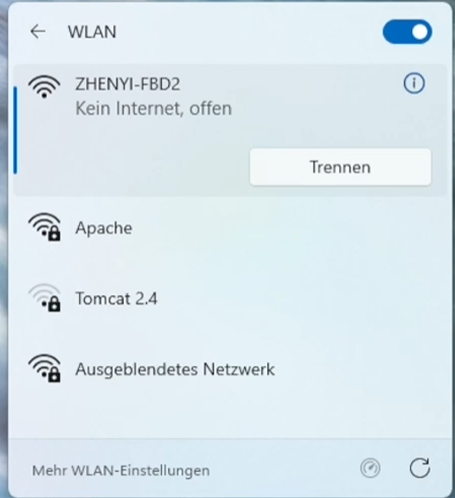
For the WIFI/IP camera to communicate with BulletHawkHM, the camera and PC must be on the same local network (subnet).
-
WIFI Camera: Turn on the camera. Connect the camera either to the network or directly to the PC.
-
Check: Make sure your PC is actively connected to the same router (via LAN or Wi-Fi) as the camera. In the event that the camera is connected directly to the PC, the IP address is the default gateway.
Step 2: Find out the Camera’s IP Address
To access the video stream, BulletHawkHM requires the network address (IP address) of the camera and, if known, the format. If only the IP address is provided, BulletHawkHM will search for the format, which may take some time.
📌 Important Tip: To prevent the router from assigning a different IP address to the camera after a restart, activate the option "Always assign this device the same IPv4 address" (or similar wording) in your router settings for this specific device.
Step 3: Enter the IP Address in BulletHawkHM
Once you know the IP address and the protocol of the camera, the connection can be set up in the software.
-
Start BulletHawkHM on your PC.
-
Navigate to SetupVideo (Camera Settings).
-
Select "Connect IP Camera" as the source type.
-
Enter the address in the required format. Usually, the standardized RTSP (Real-Time Streaming Protocol) is used here. The input format is generally:
rtsp://[USERNAME]:[PASSWORD]@[IP ADDRESS]:[PORT]/[STREAM PATH]-
Example 1:
rtsp://admin:This email address is being protected from spambots. You need JavaScript enabled to view it. :554/h264Preview_01_main -
Example 2:
192.168.1.1(here BulletHawkHM automatically searches for the format) (Note: You can find the exact stream path in your camera manufacturer's manual or the software specifications).
-
-
Click on "Connect" or "Apply".
-
Once the camera and format have been found, a message will appear stating that the camera has been successfully connected. Confirm this with OK and proceed with the remaining setup steps as usual.
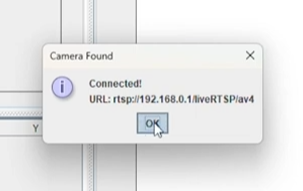
📌 Important Tip: If only the IP address was known at the beginning, you can note down the full URL after successfully connecting the camera to shorten the search time the next time you connect.
Video: Connecting WIFI/IP CAM
- Details
- Written by: Dirty Harry
Purpose and Mission of the Website
The sole purpose of this website is to provide and make accessible information and valuable knowledge regarding the topics covered here. It is primarily intended as a platform for the exchange of information and a space for constructive conversation.
The focus is on sharing experiences and insights, as well as collective learning. This site serves as a pure information source and reference work, where knowledge and the dialogue between users take center stage.
In this process, user data plays no role: the focus remains strictly on the level of content and community interaction, without personal information being collected or utilized. Your visit and your participation in the exchange of information remain completely anonymous and serve the sole purpose of spreading and deepening knowledge within the community.
Privacy Policy & Terms of Use
This website places the highest value on your privacy. No directly user-related data is stored or processed in any way that would allow conclusions to be drawn about your person. Your visit to this site is and remains completely anonymous, as no personal information such as names or other identifying characteristics are recorded.
Data Collection for Statistics: Insofar as data is collected for statistical purposes (e.g., to analyze page views), this is done exclusively in encoded form. Through this encryption or anonymization, the data is rendered unidentifiable to third parties as well as the operator. Identifying individual visitors is thus technically impossible.
Non-commercial Character & Financing: Furthermore, this website pursues no commercial interests in terms of profit-making intentions. The operation of the site is of a purely private nature and does not aim for economic advantage. To cover the high costs for servers, hosting, and the provision of infrastructure, a small download fee is charged for software downloads. This fee serves exclusively the maintenance of the project and the coverage of ongoing operating costs.
Beyond this, there remains the voluntary option to support the website, the development of the program "BulletHawkHM," and its maintenance through additional donations.
- Details
- Written by: Dirty Harry
 Deutsch (Österreich)
  English (United Kingdom)